RRT Navigation
Goal
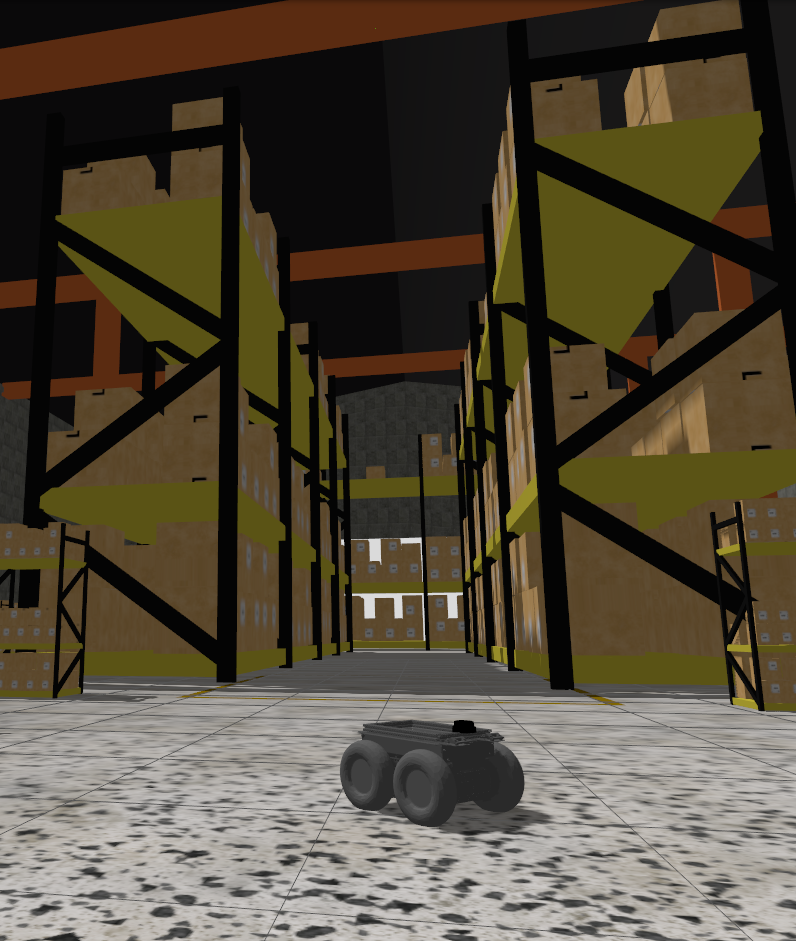
The goal of this exercise is to implement a Rapidly-exploring Random Tree (RRT) path planning algorithm that allows a robot to navigate autonomously through a warehouse environment from its current position to a target destination.
The robot must be able to:
- Load and process a 2D occupancy map of the environment
- Build a global RRT that explores the free space of the map
- Extend the existing tree toward a goal position to find a collision-free path
- Optionally simplify the path using shortcutting
- Follow the computed path by navigating through each waypoint in sequence
Frequency API
Python
import Frequency- to import the Frequency library class. This class contains the tick function to regulate the execution rate.Frequency.tick(ideal_rate)- regulates the execution rate to the number of Hz specified. Defaults to 50 Hz.
C++
#include "Frequency.hpp"- to import the Frequency library class. This class contains the tick function to regulate the execution rate.Frequency freq = Frequency();- to instanciate the Frequency class.freq.tick(ideal_rate);- regulates the execution rate to the number of Hz specified. Defaults to 50 Hz.
Robot API
This exercise now supports ROS 2-direct implementation in addition to the original HAL-based approach. Below you’ll find the details for both options.
HAL-based Implementation
Python
import HAL- to import the HAL library class. This class contains the functions that receive information from the sensors or work with the actuators.import WebGUI- to import the WebGUI (Web Graphical User Interface) library class. This class contains the functions used to interact with the map visualization and coordinate conversions.HAL.getPose3d().x- to get the ground-truth X position of the robot in world coordinates.HAL.getPose3d().y- to get the ground-truth Y position of the robot in world coordinates.HAL.getPose3d().yaw- to get the ground-truth orientation of the robot in radians.HAL.setV(v)- to set the linear velocity of the robot (m/s).HAL.setW(w)- to set the angular velocity of the robot (rad/s).WebGUI.getMap()- returns the warehouse map as a NumPy array (RGB, 603×1002 pixels).WebGUI.showNumpy(image)- displays a NumPy image array on the map canvas. Accepts RGB or grayscale arrays; resizes automatically to 603×1002 if needed.WebGUI.worldToMap(x, y)- converts world coordinates (meters) to map pixel coordinates(col, row).WebGUI.mapToWorld(col, row)- converts map pixel coordinates(col, row)to world coordinates(x, y)in meters.WebGUI.line(color, p1, p2)- draws a line on the map overlay between two world-coordinate points.coloris an RGB tuple, e.g.(0, 255, 0).p1andp2are world-coordinate tuples(x, y).WebGUI.clearLines()- clears all lines previously drawn on the map overlay.
C++
#include "HAL.hpp"- to import the HAL (Hardware Abstraction Layer) library class. This class contains the functions that send and receive information to and from the Hardware (Gazebo).#include "WebGUI.hpp"- to import the WebGUI (Web Graphical User Interface) library class. This class contains the functions used to interact with the map visualization and coordinate conversions.HAL::set_v(velocity);- sets the linear velocity of the robot. The input is afloat. Returnsvoid.HAL::set_w(velocity);- sets the angular velocity of the robot. The input is afloat. Returnsvoid.HAL::get_pose3d();- returns the ground-truth robot pose as aHAL::Pose3d.HAL::get_pose3d().x;- gets the robot x position in world coordinates (double).HAL::get_pose3d().y;- gets the robot y position in world coordinates (double).HAL::get_pose3d().yaw;- gets the robot orientation around the vertical axis in world coordinates (double).WebGUI::get_map(url);- loads the warehouse map from disk and returns it as a colourcv::Mat.urlis the map path,/resources/exercises/rrt/images/warehouse.png.WebGUI::show_numpy(image);- displays acv::Maton the map canvas. Accepts colour or grayscale images; resizes automatically to 603×1002 if needed.WebGUI::world_to_map(x, y);- converts world coordinates (metres) to map pixel coordinates. Returns astd::vector<int>{col, row}.WebGUI::map_to_world(col, row);- converts map pixel coordinates to world coordinates (metres). Returns astd::vector<double>{x, y}.WebGUI::line(color, p1, p2);- draws a line on the map overlay between two world-coordinate points.coloris astd::vector<int>{r, g, b},p1andp2arestd::vector<double>{x, y}.WebGUI::clear_lines();- clears all lines previously drawn on the map overlay.
In order to use the HAL-based controls you must include the following lines:
#include "HAL.hpp"
#include "WebGUI.hpp"
#include "Frequency.hpp"

void exercise() {
    Frequency freq = Frequency();
    // Enter sequential code!

    while (true)
    {
        // Enter iterative code!
        freq.tick();


    }
}
ROS 2-direct Implementation
Use standard ROS 2 topics for direct communication with the simulation.
-
/cmd_vel- Publish to this topic to set both linear and angular velocities. Message type:geometry_msgs/msg/Twist -
/odom- Subscribe to this topic to receive the robot odometry, from which the pose (x,y,yaw) can be extracted. Message type:nav_msgs/msg/Odometry
For map debugging, the /webgui/* topics mirror the WebGUI drawing methods one to one:
-
/webgui/debug_image- Publish to this topic to display an image on the map canvas, equivalent toshowNumpy. Message type:sensor_msgs/msg/Image, encodingbgr8. -
/webgui/lines- Publish to this topic to draw lines on the map overlay, equivalent toline. Message type:std_msgs/msg/String, containing a JSON array of entries{"color": [r, g, b], "p1": [x, y], "p2": [x, y]}in world coordinates. -
/webgui/clear_lines- Publish to this topic to clear all lines previously drawn on the map overlay, equivalent toclearLines. Message type:std_msgs/msg/Empty.
All /webgui/* topics use the default QoS profile with a history depth of 10.
Loading the map image itself is not exposed as a topic, so a ROS 2-direct solution should read /resources/exercises/rrt/images/warehouse.png directly from disk and apply the same world-to-map transform used by WebGUI, resolution 0.05 m/px, origin (-15.0, -25.0), size 1002x603 px.
Python
Note: Ensure this import is included in your script to access the Web GUI functionalities.
import WebGUI - to enable the Web GUI for visualizing debug information.
To have frequency control you need to use standard ROS 2 mechanisms to manage loop timing:
rclpy.spin()- Event-driven execution using callbacks.rclpy.spin_once()- Single-step processing, often with custom timers.rclpy.Rate()- Loop-based frequency control.
Note
WebGUI already initializes rclpy internally, so this should be taken into account when building a direct ROS 2 solution.
C++
In order to use direct ros controls you must include the following lines:
#ifndef USER_NODE
#define USER_NODE

#include "rclcpp/rclcpp.hpp"

class UserNode : public rclcpp::Node {
  // Your class
};

#endif
You must define USER_NODE and a UserNode node class.
To have frequency control you may use a timer and a control function as follows:
  UserNode() : Node("user_node")
  {
    // More subscribers and publishers
    timer_ = create_wall_timer(100ms, std::bind(&UserNode::control_cycle, this));
  };

// More Code

  void control_cycle(){
    // Your function
  };
Theory
Path Planning
Path planning is the problem of finding a collision-free route for a robot between a start position and a goal position in an environment with obstacles. Classical methods such as visibility graphs build an explicit discrete representation of the free space and guarantee optimal solutions, but their computational cost grows rapidly with the complexity of the environment. Sampling-based planners like RRT take a different approach: instead of constructing the full free space graph, they incrementally explore it by random sampling, making them practical in complex and high-dimensional environments.
Rapidly-exploring Random Tree (RRT)
An RRT is a tree data structure rooted at the start configuration that grows by randomly sampling the free space and extending toward the sampled points. Because samples are drawn uniformly from the entire configuration space, the tree expands rapidly into unexplored regions — hence the name. The algorithm is simple, general, and does not require any preprocessing of the obstacle geometry.
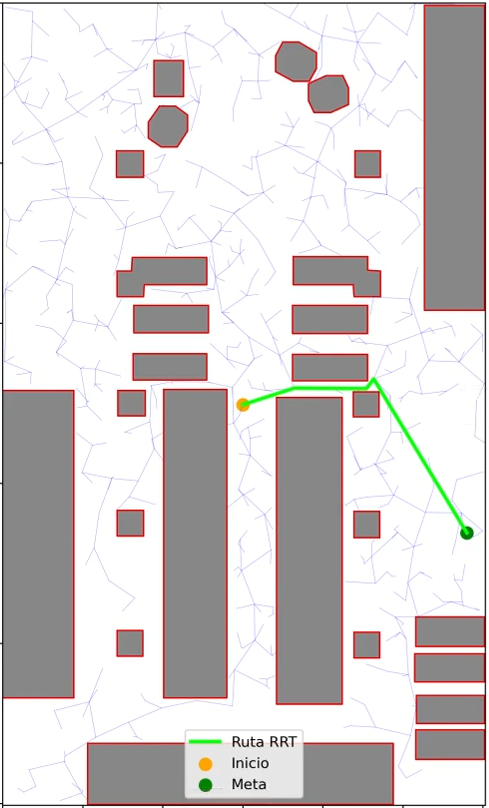
Basic algorithm:
- Initialize the tree with the start node.
- Sample a random point in free space. With a small probability (
goal_sample_rate), sample the goal directly instead. - Find the nearest node in the current tree to the sampled point.
- Extend the tree from the nearest node toward the sample by a fixed
step_size. If the sample is closer thanstep_size, connect directly. - If the new segment is collision-free, add the new node to the tree with the nearest node as its parent.
- If the new node is within
goal_thresholdof the goal and the connecting segment is also free, add the goal node and terminate successfully. - If
max_iterationsis reached without connecting to the goal, report failure.
Key parameters:
| Parameter | Effect |
|---|---|
step_size |
Maximum extension per iteration. Larger values explore faster but may miss narrow passages. |
goal_sample_rate |
Probability of sampling the goal directly. Higher values bias the tree toward the goal but reduce global exploration. |
goal_threshold |
Distance at which a node is considered close enough to attempt a direct connection to the goal. |
max_iterations |
Maximum number of tree extension attempts before giving up. |
Probabilistic Completeness
RRT is probabilistically complete: if a solution path exists, the probability of finding it converges to 1 as the number of iterations tends to infinity. This is because the Voronoi bias of the algorithm ensures that nodes with large unexplored regions around them are more likely to be selected for expansion, causing the tree to progressively cover all reachable free space.
In practice, this means that given enough iterations, RRT will always find a path if one exists. However, it provides no guarantee about how many iterations are needed, and convergence can be slow in environments with narrow passages.
Goal Bias and Exploration Tradeoff
The goal_sample_rate parameter controls the balance between exploration and exploitation. A purely random tree (rate = 0) explores the space efficiently but may take a long time to reach the goal. A highly biased tree (rate close to 1) converges quickly when the goal is directly reachable, but behaves poorly when obstacles block the direct path, as the tree wastes iterations trying to extend toward an unreachable point.
A typical value of 5–15% goal sampling provides a good balance: the tree explores broadly while still being gradually pulled toward the goal.
Global Tree + Extension Strategy
A useful variant for repeated queries over the same map is to first build a global RRT that covers the free space without a specific goal, and then extend that tree toward each new goal when needed.
This strategy reuses computation: the global tree already explores most of the free space, so the extension toward a new goal typically requires very few additional iterations. The start position is connected to the nearest node of the existing tree (if the connecting segment is collision-free), and the tree is then grown toward the goal.
This is particularly advantageous when multiple goals need to be reached in the same environment, or when the robot needs to replan frequently from different positions.
Collision Checking
A segment between two nodes is considered free if no point along it falls inside the dilated obstacle mask. This check is performed in pixel space by sampling points along the segment at regular intervals. The density of samples determines the minimum obstacle size that can be reliably detected: a very sparse sampling may allow the tree to pass through thin walls.
Path Reconstruction
Because the tree may connect the start node to an existing global tree node, the path between start and goal is found by locating the lowest common ancestor (LCA) of both nodes within the tree structure, then concatenating the path from start up to the LCA with the reversed path from goal up to the LCA.
Path Shortcutting
The raw RRT path typically contains many small zigzag segments caused by the random nature of the tree. A shortcutting post-processing step removes unnecessary intermediate waypoints: for each pair of non-adjacent waypoints, if the direct segment between them is collision-free, all intermediate waypoints between them are removed. Applying multiple passes of shortcutting produces significantly smoother and shorter paths.
Suboptimality and RRT*
A fundamental limitation of RRT is that it is not optimal: the path it finds is generally longer than the true shortest path. This is because nodes are connected to their nearest neighbor at the time of insertion, with no mechanism to rewire the tree when a shorter connection is found later.
RRT* is an extension that addresses this by adding a rewiring step: after adding a new node, the algorithm checks whether any nearby nodes could reach the new node more cheaply through it, and updates their parent pointers accordingly. RRT* converges asymptotically to the optimal solution as the number of samples grows. For this exercise, plain RRT combined with path shortcutting is sufficient.
Narrow Passages Problem
RRT performs poorly in environments with narrow passages — corridors or gaps that are much smaller than the step size or the typical sample spacing. The probability of sampling a point inside a narrow passage is proportional to its volume relative to the total free space, which can be extremely small. As a result, the tree may take a very large number of iterations to discover and traverse such passages.
Several strategies exist to mitigate this, such as bridge sampling (sampling pairs of points in collision and using their midpoint) or adaptive step sizes. For typical warehouse environments with reasonably wide corridors, standard RRT performs adequately.
Obstacle Inflation
Before running the planner, the obstacle mask is morphologically dilated using a square kernel. This creates a safety margin so that the robot body does not clip obstacle edges when following the planned path. The inflation radius should be at least as large as the robot’s radius, and preferably somewhat larger to account for control and localization error.
Videos
Contributors
- Contributors: Carlos Iglesias
- Maintained by Carlos Iglesias